
Free tools in Flow
This page explains how public free tools connect to Flow. Full wizard how-tos stay on the standalone free-tools guides. Here: what happens when you already have (or create) a Flow organization.
Free tools need no signup. Shareable links, phone-first.
The three free tools
Section titled “The three free tools”| Tool | Open it (no account) | Creates in Flow as |
|---|---|---|
| Scope Clarification | Free tools → Scope Clarification | New Clarification in your company |
| Request Quote | Free tools → Request Quote | New Quote Request in your company |
| Work Order | Free tools → Work Order | New Work Order in your company |
Public wizard step labels (short):
| Tool | Steps |
|---|---|
| Scope Clarification | Select Form → Your details → Fill Form → Invite Clients → Review & Send |
| Request Quote | Select Form → Your details → Fill Form → Add Recipients → Review & Send |
| Work Order | Your details → Job site → Complete work order |
Step-by-step UI: Scope Clarification, Request Quote, Work Order.
Scope Clarification vs Request Quote
Section titled “Scope Clarification vs Request Quote”| Scope Clarification | Request Quote | |
|---|---|---|
| Purpose | Shared details form | Per-vendor pricing |
| Invite step | Invite Clients | Add Recipients |
| Open it | Scope Clarifications (or free tools → Scope Clarification) | Quote Requests (or free tools → Request Quote) |
Already logged in
Section titled “Already logged in”When you open a free-tool link while signed in, Flow picks where to create:
- Not signed in, or no company to choose from → stay on the no-account public wizard.
- One company → go straight into that company’s create screen (table above).
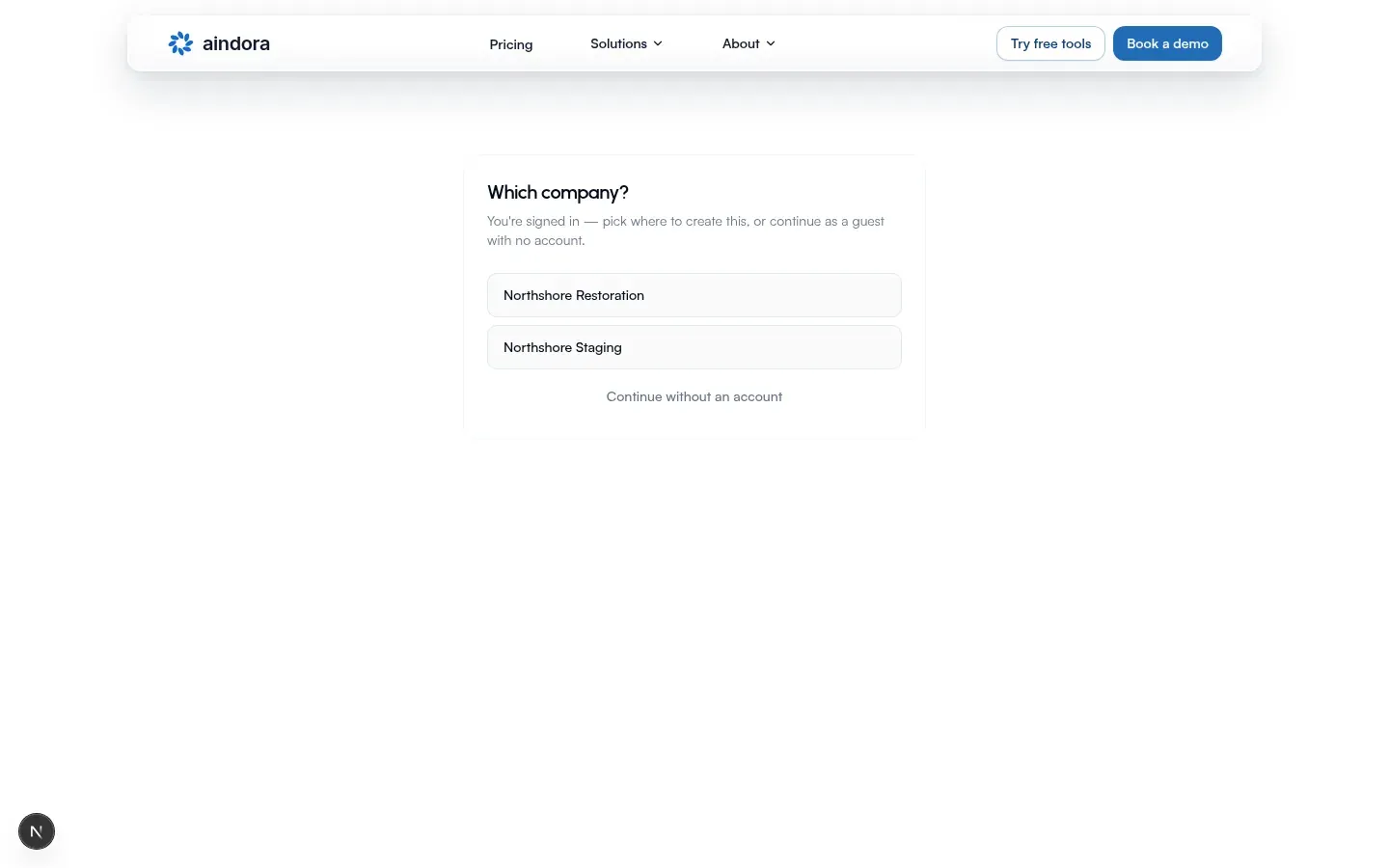
- More than one company → picker titled Which company?
- Pick a company → open that company’s create screen.
- Or Continue without an account → same tool without signing in.
On the picker you’ll see: you are signed in; pick where to create this, or continue without an account.
After create inside your company, you use the usual Flow pages: Scopes, Quotes, Work orders, and Projects and clarifications.
Import items from before you signed up
Section titled “Import items from before you signed up”Scope clarifications, quote requests, and work orders you created without a company can be added to a company you own. Flow matches them to your account email.
When Flow offers import
Section titled “When Flow offers import”| Moment | What you see |
|---|---|
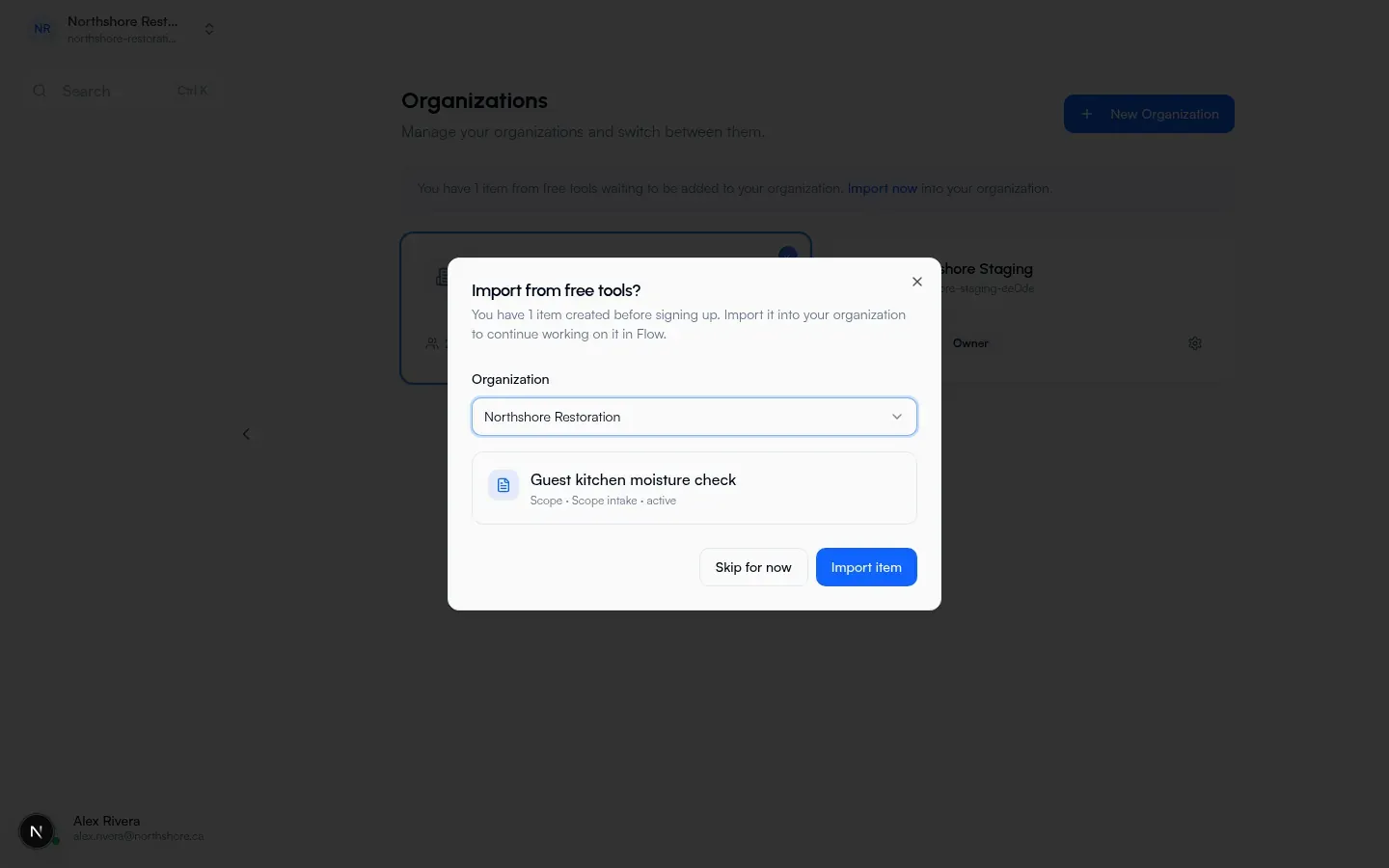
| After Create Organization | If unclaimed items exist, the create flow moves to Import from free tools? before closing |
| On Organizations | Banner when unclaimed items exist (counts scopes + work orders together) |
Organizations banner copy:
- One item: You have 1 item from free tools waiting to be added to your organization.
- Many: You have N items from free tools waiting to be added to your organization.
- If you already created a company: link Import now … into your company.
- If you only belong to companies you did not create: Create your own company to import them.
- If you have no companies: Create your first company to import them.
Dialog title: Import from free tools?
What you’ll see: items created before signing up; add them to your company to continue in Flow.
The import dialog lists each item:
- Scopes: title (or Untitled scope), line like scope type and status
- Work orders: title (or Untitled work order), line like number and status
Actions: Skip for now / Import item or Import items.
If you own more than one company, an Organization dropdown appears (default text Select organization). With one company, smaller text: Import into {company name}.
Success message: Imported from free tools (it names how many items were added).
Import only works for companies you created, not every company you belong to.
First-session setup that leads here: Flow: Getting started.
Prompts to save your work (no account)
Section titled “Prompts to save your work (no account)”After a free-tool send, the tracking page can show a prompt to save your work. You can dismiss it for the session. It does not block your work.
Buttons you may see:
- Not signed in: Create free account, plus Log in
- Already signed in: Save to an organization
- Dismiss: Not now
The prompt asks if they want easier tracking: sign up to Aindora to keep everything in one place, or save the job to an organization (or create one). Some versions also show status lines such as someone opened or responded.
Related guides
Section titled “Related guides”Standalone free tools (full how-tos)
Flow